How to Trade Crypto Futures Contracts on ZMO
Learn how to trade crypto futures on ZMO — from choosing an order type to setting leverage and managing liquidation risk. Includes a free demo to practice before going live.
LL
Lulu Liu
8 min

Crypto futures contracts let you trade the price direction of an asset — without owning it outright. If you've been watching the market move and want to do more than watch, you can try trading futures on ZMO
This guide walks you through everything you need: what crypto futures are, how perpetual futures work, and exactly how to place your first trade on ZMO.
What Are Crypto Futures Contracts?
A futures contract is an agreement to buy or sell an asset at a set price on a future date. In crypto markets, futures let traders speculate on price movements — up or down — without holding the underlying coin.
Most crypto exchanges, including ZMO, offer perpetual futures contracts: a type of futures with no expiry date. Unlike traditional futures, perpetual contracts stay open indefinitely and use a funding rate mechanism to keep the contract price anchored to the spot market. If you're long on BTC-PERP and the market rises, your position gains in real time.
Perpetual futures are the most traded derivatives product in crypto — accounting for the majority of daily volume across major exchanges.
What Is Leverage in Crypto Futures?
Leverage is what makes futures different from spot trading. When you trade with leverage, a small deposit controls a much larger position.
On ZMO's futures platform, you can use leverage to maximize trading power. With leverage, the upside moves faster. So does the downside — which is why understanding leverage before you trade is essential.
Important: Leverage amplifies both gains and losses. You can lose more than your initial margin if the market moves against your position. Always apply appropriate risk management, including stop-loss orders.
For a clear explanation of how leverage and margin interact, Investopedia's guide to margin trading is worth reading before you start.
How to Trade Crypto Futures Contracts on ZMO
Here's the step-by-step process to open your first futures position.
Step 1 — Go to the Futures Page
Navigate to the ZMO Futures page. You'll see the trading pair (e.g. BTC-PERP), the live price chart, and the order panel on the right.
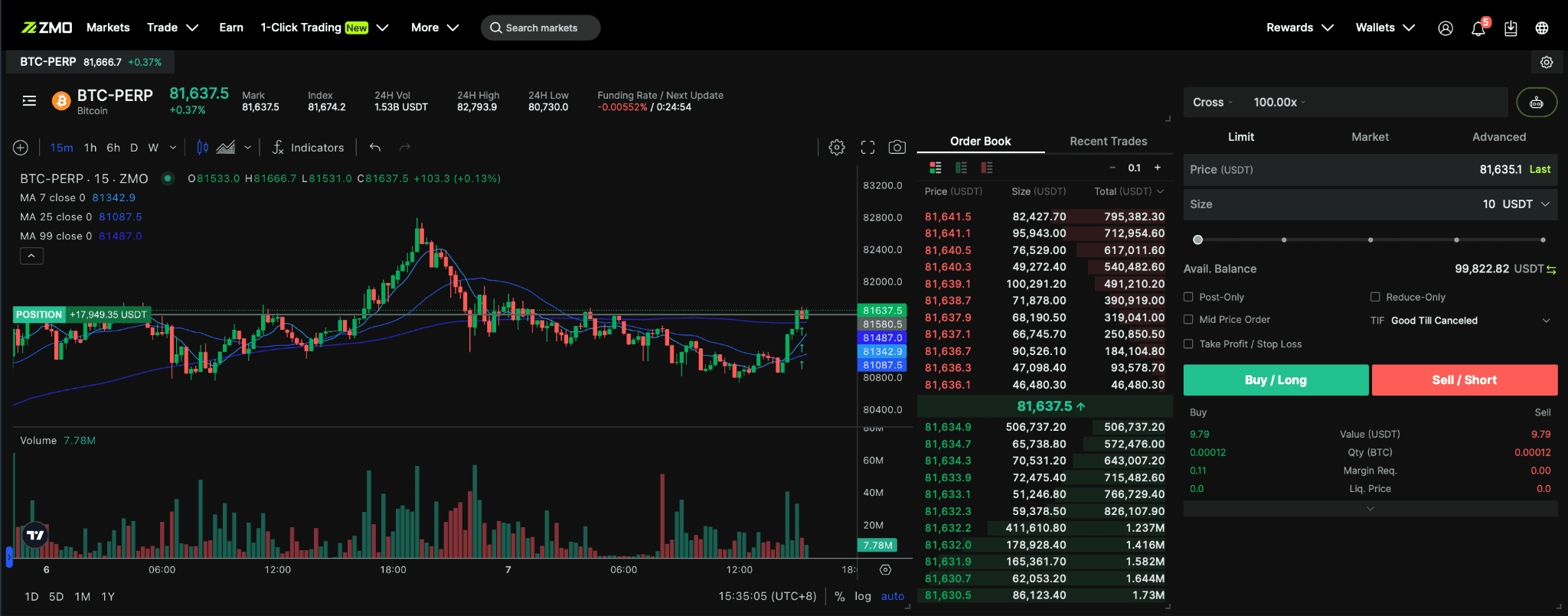
If you want to explore without risking real money first, use ZMO's Demo mode — you get simulated funds to practice with before going live.
Step 2 — Select an Order Type
ZMO supports multiple order types:
Market Order — executes immediately at the current market price. Best when speed matters more than price precision.
Limit Order — executes only when the market reaches your specified price. Best when you want control over your entry.
Stop Order — triggers a market or limit order when a set price is hit. Used for stop-losses and conditional entries.
Choose the order type that matches your strategy. If you're new to order types, ZMO's Trading FAQ covers each one with examples.
Step 3 — Enter the Order Price and Size
For limit orders: enter the price you want to buy or sell at.
For market orders: the price fills automatically — just set your size.
Order size is the notional value of your position. With 10x leverage and a $10 deposit, your position size is $100. With 100x, it's $1,000.
Step 4 — Select Leverage and Futures Wallet
Use the leverage slider to choose your multiplier. ZMO lets you adjust this per trade — you're not locked into the maximum.
Your call. You decide how much leverage you use. Lower leverage means more margin cushion; higher leverage means faster moves in both directions. Start lower until you understand how your chosen asset moves.
Your Futures Wallet is the account balance funding your margin. Make sure it's topped up before placing your order. You can move funds from your main ZMO wallet via the Move function in the app.
Step 5 — Submit Your Order
Hit Buy (long — you expect the price to rise) or Sell (short — you expect it to fall).
Your position will appear in the open positions panel below the chart. From here you can:
Monitor your unrealised P&L in real time
Add a Take Profit or Stop Loss level
Close the position partially or fully at any time
Key Concepts to Know Before You Trade
Funding Rate: On perpetual contracts, longs pay shorts (or vice versa) at regular intervals to keep the contract price close to spot. If you hold a position for extended periods, funding costs accumulate. ZMO displays the current funding rate on the futures page.
Liquidation: If your margin falls below the maintenance level, your position is automatically closed to prevent your loss from exceeding your deposit. Set stop-losses to stay in control before liquidation kicks in.
Mark Price vs. Last Price: ZMO uses the Mark Price (a fair-value composite across exchanges) to calculate unrealised P&L and trigger liquidations — not the Last Price. This prevents manipulation-based liquidations from short-term price spikes.
Start With the Free Demo
Not ready to put real money in yet? ZMO's Demo gives you simulated funds to practice order placement, test leverage settings, and get familiar with the interface — no deposit required.
When you're ready to go live, start small. Use the ZMO Futures page to place your first real trade.
Frequently Asked Questions
What is the minimum deposit for ZMO futures? You can start trading futures on ZMO from $10, depending on the leverage tier selected.
Does ZMO charge fees on futures trades? Yes. ZMO charges a maker/taker fee structure on futures. Current rates are listed on the ZMO Fees page.
Can I trade futures on mobile? Yes. ZMO's app is fully mobile-native — the futures interface is optimised for one-tap trading on iOS and Android.
What happens if I get liquidated? Your position is closed and your margin is used to cover the loss. You keep your remaining wallet balance. ZMO's liquidation engine steps in at the maintenance margin level to prevent further loss.
Crypto futures trading involves significant risk, including the risk of total loss of deposited margin. This article is for educational purposes only and does not constitute financial advice.


