Mastering Take-profit and Stop-loss Orders in Crypto Futures Trading
Learn how to set take-profit and stop-loss orders on ZMO's futures interface — key risk management tools that lock in gains and cap losses before the market moves against you.
LL
Lulu Liu
8 min

What are take-profit and stop-loss orders?
Take-profit and stop-loss orders are conditional trades used by futures traders to set specific trigger conditions, order amounts, and quantities upon taking a position. When the market price matches the trigger conditions set by the trader, the trade will be initiated and placed in the market. Such orders are typically placed for risk management reasons.
Take-profit and stop-loss orders are essential for futures traders, allowing timely realization of profits when trades are favorably aligned, and preventing excessive losses or forced contract liquidation when trades are unfavorably aligned. Developing a clear understanding of take-profit and stop-loss strategies and effectively managing risks are crucial for market survival.
You can set up take-profit and stop-loss orders on ZMO’s futures trading interface, customizing them based on your trading preferences.
How to Set Up Take-profit and Stop-loss Orders on ZMO’s Trading Interface
1. Navigate to the futures trading page.
2. To illustrate, let’s consider setting a stop-loss order for an existing long position. On the trading panel, click on the “Advanced” option on the trading panel and find “Stop-Limit”. The “Trigger Price” is the market price that matches your established trigger price and initiates the order. The “Price” field represents the price at which you wish to place the order once the trigger price is hit. The “Size” represents the number of contracts you wish to implement a stop-loss order with.
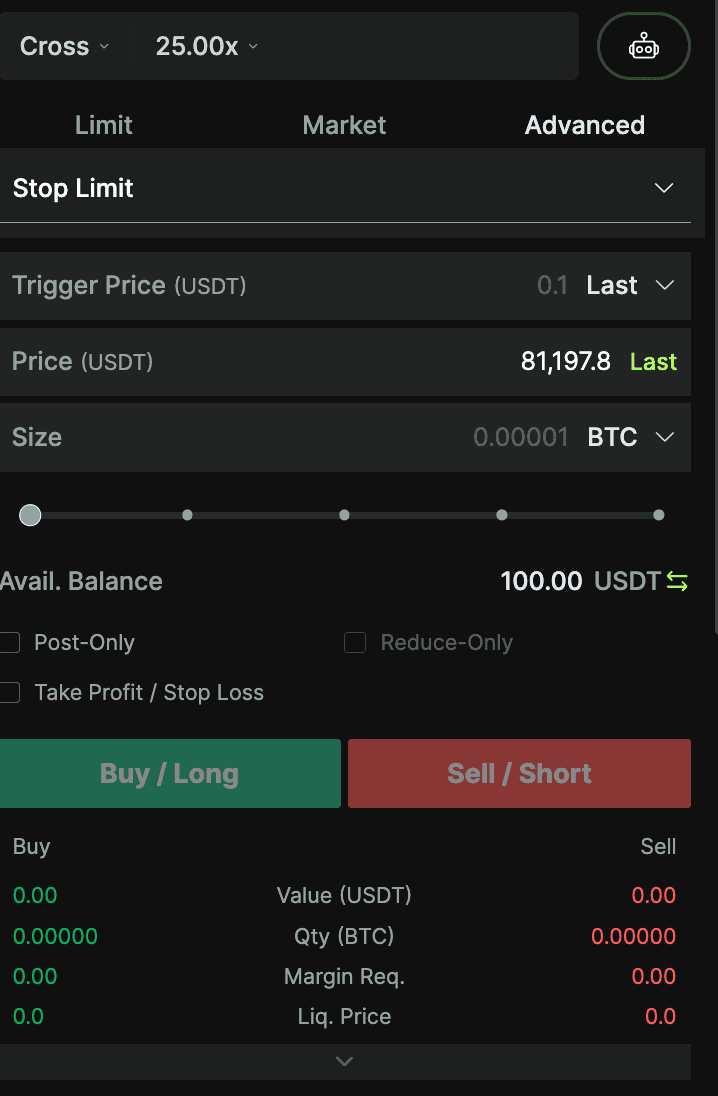
3. Please note that if you only wish to reduce your position, ensure the “Reduce Only” box is ticked. If left unticked, the system will place the order with the price and quantity you have set. Furthermore, the platform offers criteria for trigger price assessment, allowing traders to choose between using the mark price or the last price as the trigger condition.
4. The same steps are applicable when setting up take-profit orders. Additionally, the system offers market price take-profit and stop-loss orders, helping traders place a market order when the trigger price is reached.
Entire Position TP/SL: How It Works
Currently, our platform allows users to set Take Profit and Stop Loss (TP/SL) orders for their entire positions at the time of order placement. This feature is crucial for risk management - a fundamental aspect of proficient trading. By setting predefined TP and SL conditional orders, traders can automatically close positions once specific market prices are hit. This automation reduces the need for continuous monitoring, especially during market fluctuations.
What distinguishes the Entire Position TP/SL setting from the TP/SL order types?
While both the Entire Position TP/SL and the Take Profit (TP), Stop Loss (SL) orders (found in the Advanced tab of the order form) contribute to risk management, they differ in execution and purpose.Entire Position TP/SL: This feature is designed to efficiently close your entire position when the TP or SL condition is triggered. Unlike the Advanced Order TP/SL, there is no need to calculate position sizes.
Advanced Order TP/SL: Advanced TP and SL order types provide more flexibility, allowing traders to set specific TP and SL orders for a specific size. Traders can also use these order types to open new positions.
Triggering an Entire Position TP/SL adheres to the “One Cancels the Other” (OCO) principle, meaning the opposite setting will be automatically canceled.
What happens when Take Profit or Stop Loss is triggered?
When a preset TP or SL is triggered, the platform immediately places a market order to close your entire position, ensuring a timely exit from the market.
If I’ve already set a TP/SL for one position, and then input a new TP/SL condition for a subsequent order, what will happen?
If a subsequent order with a new TP/SL condition is filled, even if only partially, its TP/SL settings will replace the previous position’s settings. This offers traders to move fast by enabling swift reactions to market shifts. Any partial fulfillments of an order will also update the existing TP/SL settings.
What will happen if I choose both the Reduce Only and TP/SL options simultaneously?
Combining “Reduce Only” and “TP/SL” in one order is not possible. The “TP/SL” feature is primarily devised to manage risk for new positions. If you’re solely aiming to close an existing position, the “TP/SL” feature isn’t relevant.
What happens when a reduced order is set with TP/SL ?
The TP/SL settings of the reduced order will not affect nor override the existing TP/SL settings.
Example:
If a user sets a limit buy order for 1 BTC at 20,000 USDT with TP/SL values of 30,000/10,000 and subsequently places a market sell order for 2 BTC with TP/SL values of 25,000/15,000 while the limit order remains unfilled, the TP/SL settings of the filled limit order will neither impact nor override the existing TP/SL settings of the entire position.


