A Guide to Futures Grid Trading Bots on ZMO
Learn how crypto grid trading bots work on ZMO — set a price range, divide it into grids, and let the bot automatically buy low and sell high as the market fluctuates.
LL
Lulu Liu
8 min

Grid Trading is a trading strategy used in the market where a trader places multiple buy and sell orders at different price levels within a predefined price range. This strategy aims to capitalize on the volatile and fluctuating nature of cryptocurrency prices, allowing traders to make profits from price movements in both upward and downward trends. Grid trading is a relatively automated and systematic approach, as it requires less manual intervention compared to other trading methods.
How Crypto Grid Trading Bots Work - A Step by Step Guide
Launching a Simple Crypto Grid Trading Bot
Select a trading pair and price range: pick a cryptocurrency trading pair (e.g. Bitcoin Perpetual) and define a price range within which you expect the price to fluctuate. When setting a price range, it’s crucial for you to ground the range in reality - and do proper research on historical price movements, market conditions, and complete other technical analyses.
Divide the range into grids: The price range is divided into multiple equal intervals, called “grids.” The number of grids is up to you, and can be changed to reflect trader preferences, risk tolerances, and desired granularity.
Place buy and sell orders: For each grid level, place a limit buy order below the current price and a limit sell order above the current price. These orders are set by you and placed automatically by the trading system or bot.
Profit from price fluctuations: As the price of the cryptocurrency fluctuates within the desired range, the buy and sell orders are executed if and when their respective price levels are reached. If prices fluctuate according to your expectations, each executed order can generate a profit, as the buy orders are ideally lower than the sell orders.
Advantages of Crypto Grid Trading Bots
Automation: Grid trading can be automated using trading bots, reducing the need for constant manual intervention and decision-making.
Profitability in different market conditions: Grid trading has the potential to generate profits in both upward and downward trends, making it usable across various market conditions.
Risk management: By placing multiple orders at different price levels, grid trading can help spread risk and reduce the impact of sudden price movements.
However, it’s essential to note that Crypto Grid Trading also has limitations. If a strong trend emerges that doesn’t fit your price range, you may lose money. Additionally, trading fees and slippage can reduce the profitability of your strategy. It’s crucial to carefully select the trading pair, price range, and grid intervals while also considering the associated risks and potential rewards.
Launching an Advanced Crypto Grid Trading Bot with Leverage
Select trade direction: Choose the trade direction you want to use with the grid trading bot. The options are neutral, long, and short.
Select a trading pair: Choose the futures trading pair you want to trade with the grid trading bot. Commonly traded pairs include BTC-PERP, ETH-PERP, and LTC-PERP. Make sure you are familiar with all contract specifications, such as leverage, contract size, and expiry dates.
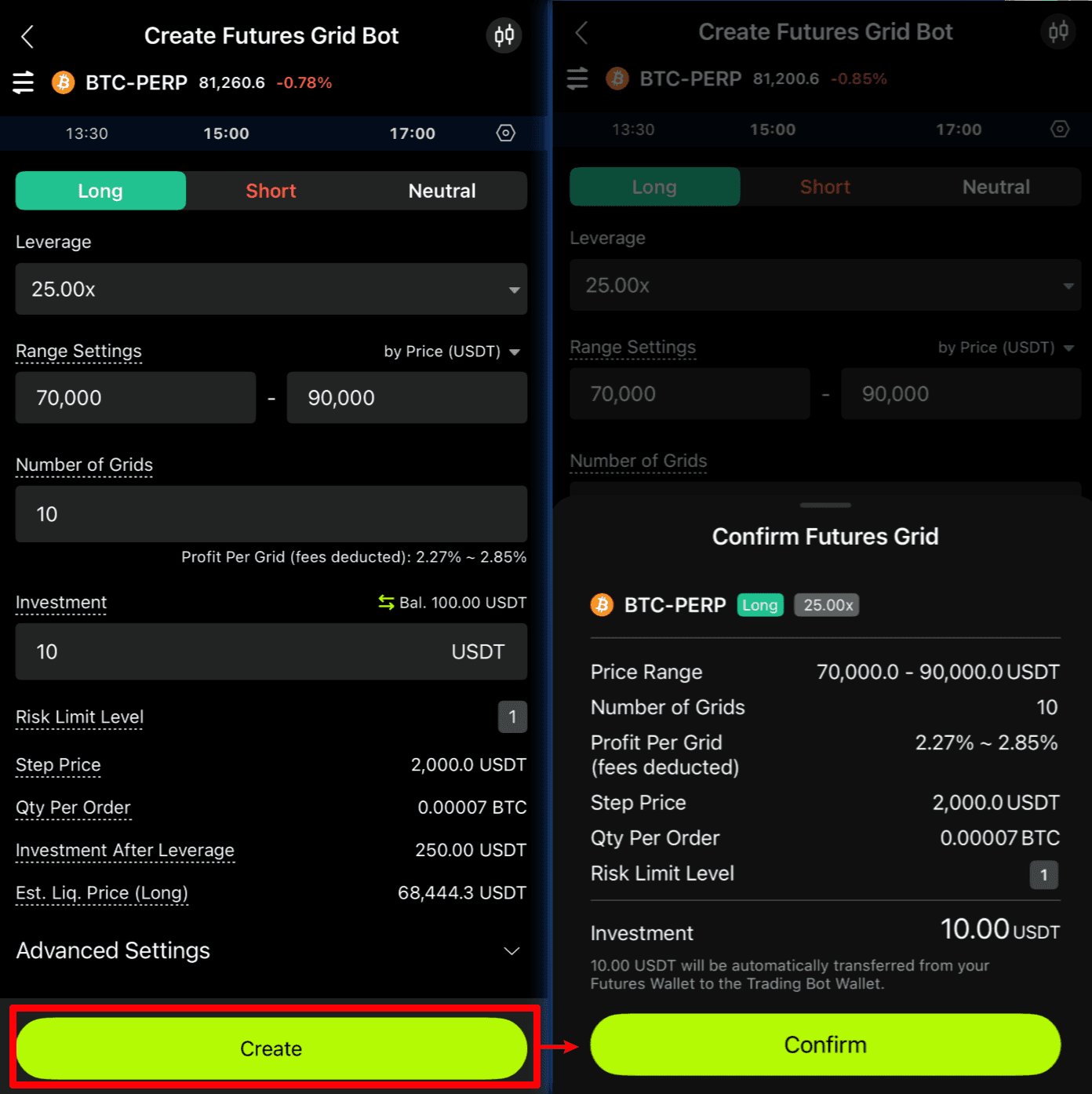
Configure bot settings: Customize settings for your Futures Grid Trading Bot. These settings typically include:
Price range: Define upper and lower price limits for your grid. This range should be based on your own market analysis and expectations of future price movements.
Grid levels: Specify the number of grid levels or intervals within your chosen price range. More levels will result in smaller price gaps between orders but may require more capital.
Initial margin: Set the initial margin for your grid strategy. This will determine the number of sizes or the amount of cryptocurrency you will trade at each grid.
Leverage: Choose the leverage you want to use for your futures trading. Higher leverage increases both your potential profit and your risk, so select this value carefully based on your risk tolerance and experience.
Advanced settings (optional): Set the out-of-range stop condition for your grid strategy. This feature can help you prevent loss if the market price fluctuates out of your predefined price range.
Activate the bot: Once you are satisfied with your settings, activate the Futures Grid Trading Bot. The bot will start placing buy and sell orders according to your configuration, and it will monitor the market to execute trades as price levels are reached.
Monitor and adjust: Keep an eye on the performance of your trading bot and the market conditions. You may need to adjust your settings or pause the bot if the market conditions change significantly or if the bot is not performing as expected.
Remember that trading futures involve significant risks, especially when using leverage. It’s crucial to thoroughly understand the mechanics of futures trading and grid trading before making any trades with a Futures Grid Trading Bot. Make sure to only invest what you can afford to lose and consider employing risk management strategies to protect your capital.
FAQ:
Q: What is the difference between long and short bots?
A:
Neutral: Ideal for range-bound markets. You can create buy and sell orders with a Futures Grid Trading Bot without a position.
Long: Ideal for trending and volatile bull markets. You can open a long position with a Futures Grid Trading Bot.
Short: Ideal for trending and volatile bear markets. You can open a short position with a Futures Grid Trading Bot.
Q: What does mid price mean?
A: The mid price is calculated as the average of the best bid and ask prices. If only bid or ask prices are available in the order book, the mid price is determined by adding or subtracting the tick price from the available bid or ask price.
Q: How do I set a price range for my bot?
A: You can set the price range by entering a specific number or percentage for the lower and upper price limits. The lower range is a percentage below the mid price, while the upper range is a percentage above the mid price.
Q: What is the initial margin?
A: The initial margin is the total margin you want to invest in the grid bot. It must be greater than or equal to the minimum initial margin required.
Q: How do I set stop conditions for my bot?
A: You can configure stop conditions by specifying the top and bottom price limits. The bot will deactivate when the market price reaches these limits. You can choose whether to trigger these limits by mark or last prices.
Q: What happens when the bot stops?
A: When the bot stops, all orders are canceled, and all positions are closed. The remaining investment amount will be transferred back to your Futures Wallet.
Q: How is the total Profit & Loss (P&L) for my bot calculated?
A: The total P&L is the sum of realized P&L and unrealized P&L, with the Return on Investment (ROI) calculated as the total P&L divided by the initial margin.
Q: What happens if my position is liquidated or undergoes Auto-Deleveraging (ADL)?
A: If your position is liquidated or undergoes an ADL, the bot will be deactivated. When the bot deactivates, you can find the cause of deactivation in the bot’s status.
Q: Under what conditions might my bot be deactivated?
A:
The bot may be deactivated if there is an insufficient account balance.
The bot may also be deactivated if the position undergoes liquidation or Auto-Deleveraging (ADL).
Using Futures Grid Bots on the ZMO App
1. Navigate to Trading Bots:
Mega Menu > Markets > Trading Bots
Trading Page > Tap the “…” in the top-right corner > Select “Trading Bot”.
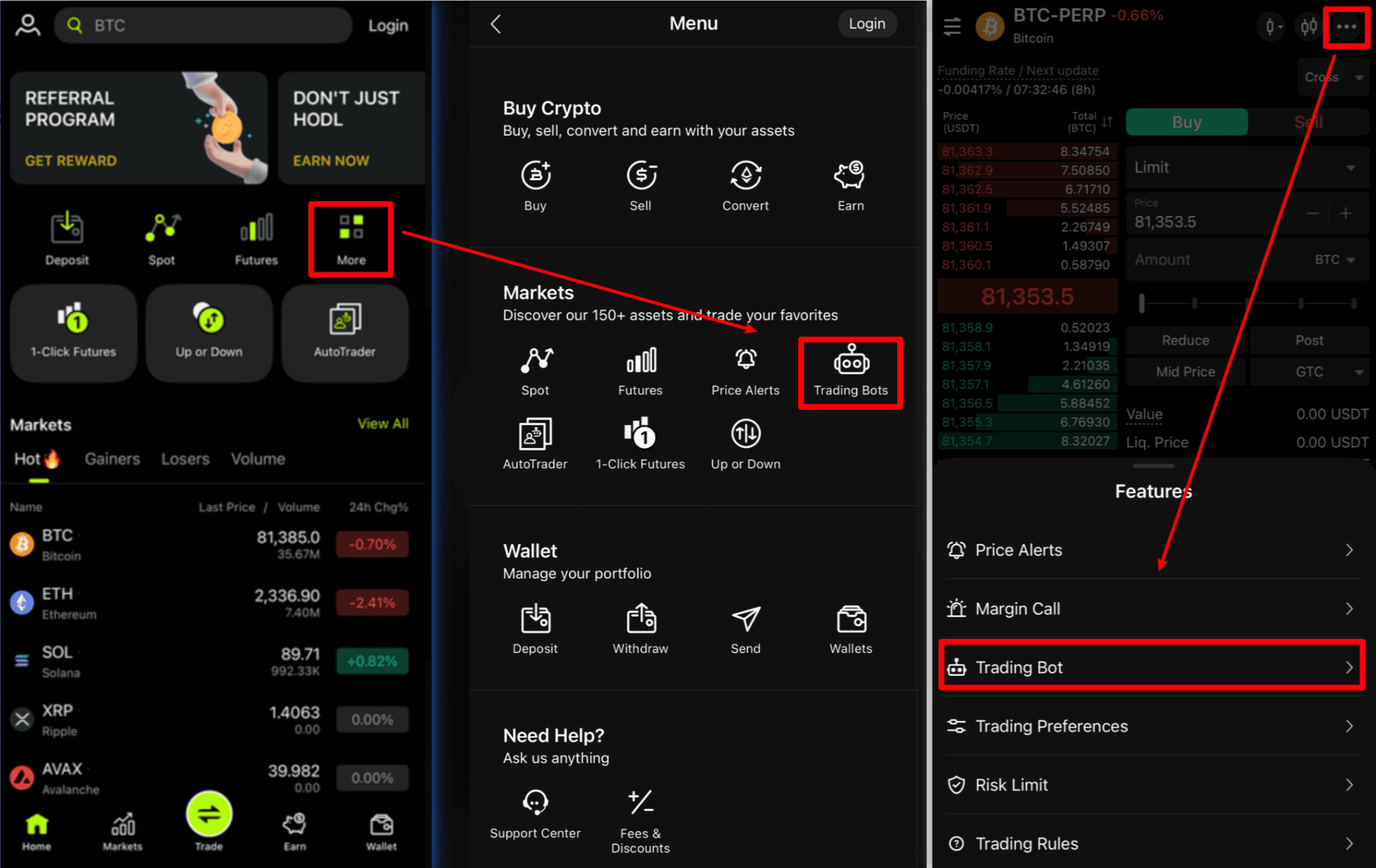
2. Bot Creation: Select “Create Grid Bot” and choose your market.
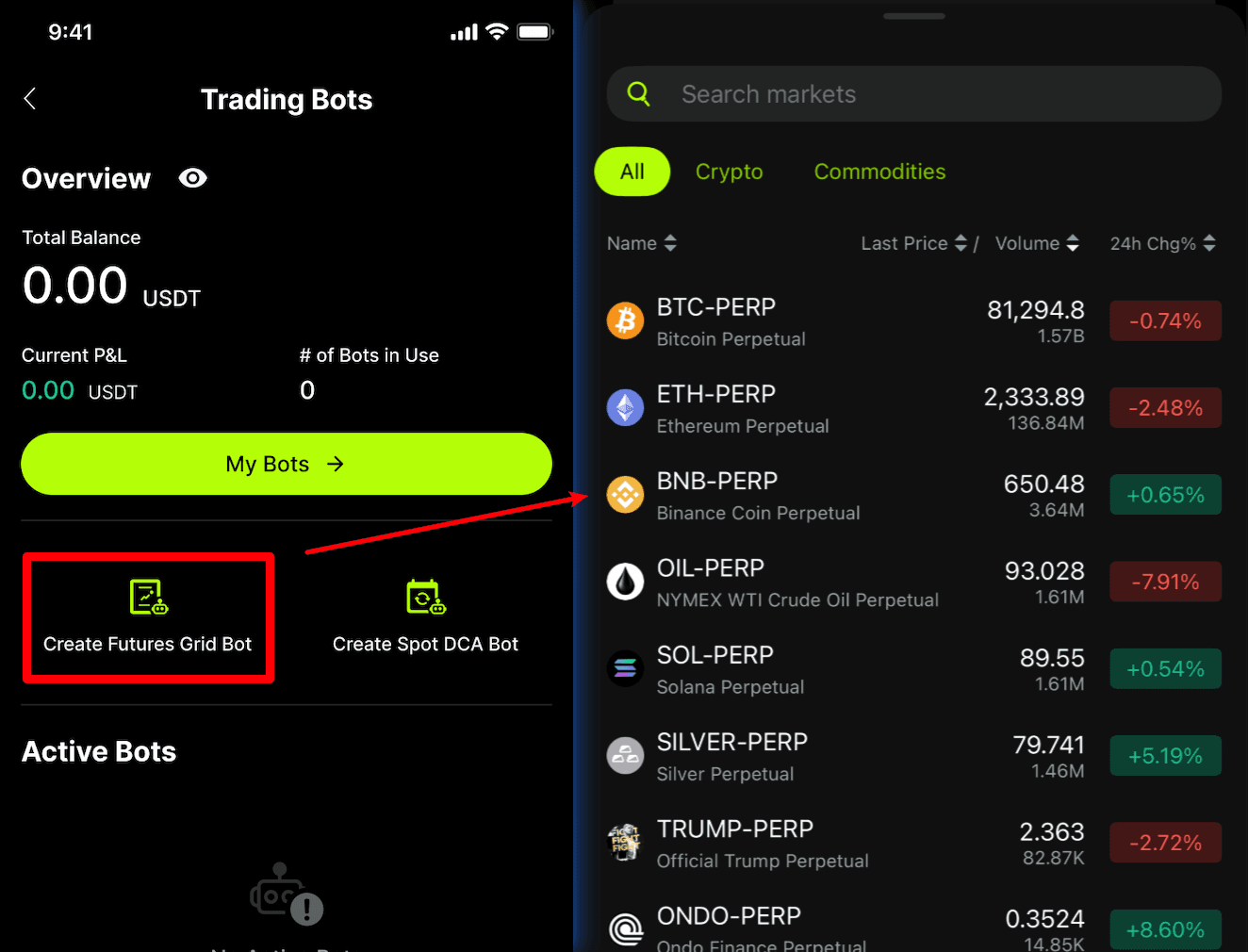
3. Configure Bot: Set your bot’s mode, price range, number of grids, and initial investment. Then confirm your settings and deploy your bot.
4. Monitor and Manage: Regularly check and adjust your bot’s settings as needed.
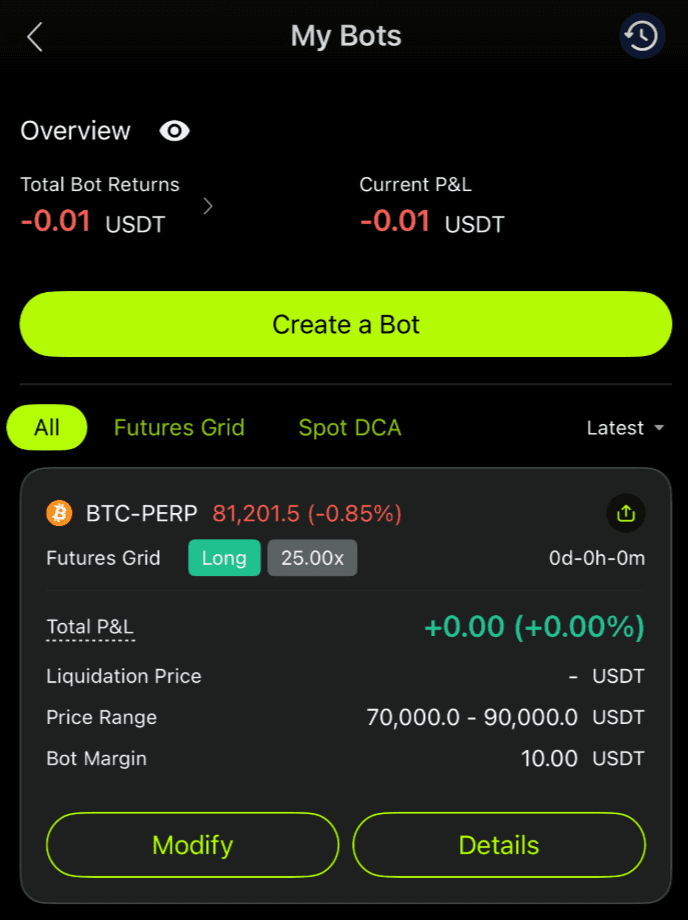
Q: How do I adjust my bot’s settings after it’s been created?
A: To adjust your bot’s settings, navigate to the “My Bots” section, select the bot you wish to modify, and change its parameters as needed. Remember to review and save these changes.
Q: How do I measure the success of my trading bot?
A: Success metrics are available in the “My Bots” section. These include total investment, total P&L, matched profits, and ROI%. Regular monitoring of these metrics is recommended for optimal bot performance.


