How Can I Deposit Cryptocurrencies on my ZMO App?
Learn how to deposit crypto on ZMO in six steps. Copy your wallet address, match your network, and send — funds typically arrive within minutes.
LL
Lulu Liu
8 min

Depositing cryptocurrency assets on the ZMO App is simple and easy. We’ve broken it down into a few steps:
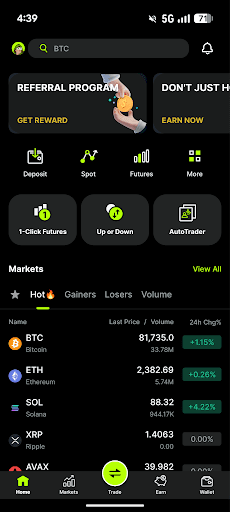
Step 1 — Open the ZMO app and tap Deposit
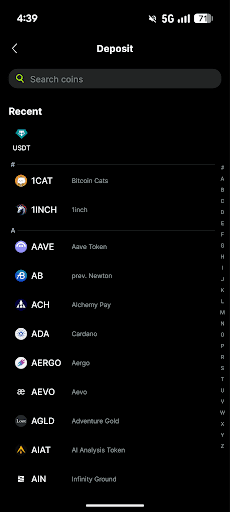
Step 2 — Choose your deposit type: select Crypto for cryptocurrency, and pick the token you want to deposit.
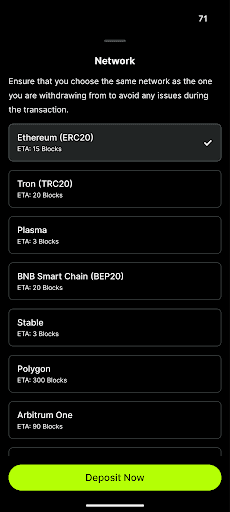
Step 3 — Select a network. Make sure this matches the network you're sending from in your external wallet — if unsure, check there first before continuing
Step 4 — Review your deposit details, including your wallet address and QR code. Read any warnings on this screen carefully before proceeding.
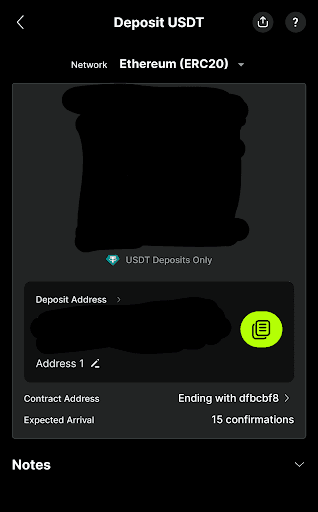
Step 5 — Save your deposit address by tapping Copy Address, or save the QR code by tapping Save Image
Step 6 — Open your external wallet and send the funds to the address you copied or scanned.
You’re all set! Note that funds may take several minutes to arrive in your ZMO account. This depends on how busy the blockchain network may be - our support team cannot help speed up the transaction. We ask that you be patient and check your balance again after a few minutes.


