How Can I Fund My ZMO Account by Depositing Cryptocurrencies?
Making your first crypto deposit on ZMO? Select your asset, match your network carefully, and copy your address — wrong networks can cause permanent loss.
LL
Lulu Liu
8 min

We’re excited that you’re looking to make your first deposit on ZMO.
To deposit cryptocurrency assets, follow these simple steps:
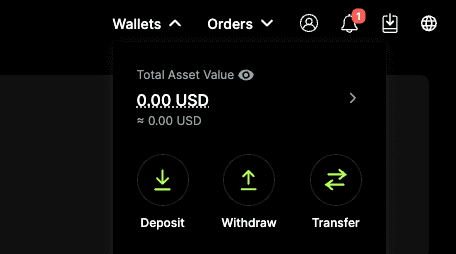
Log into your account and navigate to Wallet > Deposit.
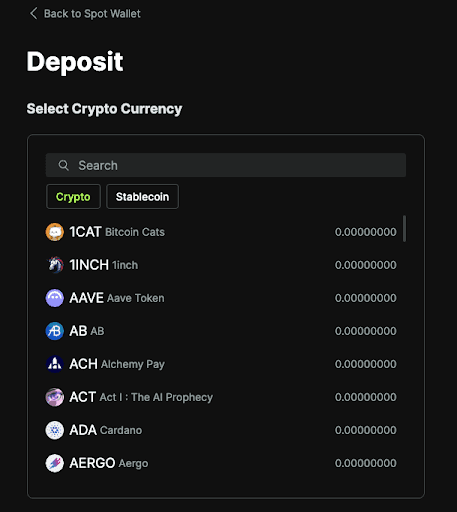
Select the cryptocurrency you wish to deposit (e.g. BTC, ETH, USDT).
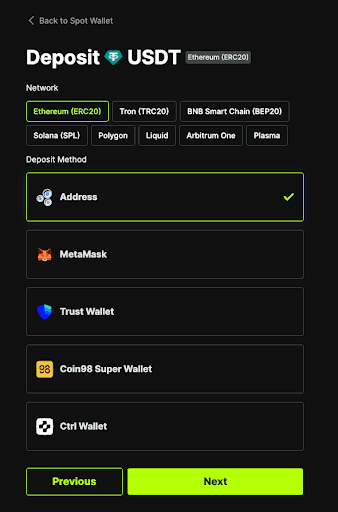
Choose the correct network for your deposit (e.g. ERC-20, TRC-20, BEP-20).
Copy your unique deposit address or scan the QR code.
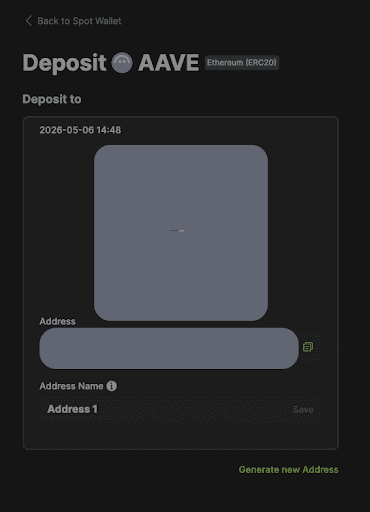
Paste this address into the withdrawal field on your sending platform and confirm the transaction.
Note that it may take a few minutes for the funds to arrive in your ZMO wallet. This depends on how busy the blockchain network is. Our support team cannot speed up the process for you.
Note: Always double-check to see if the network you pick on the ZMO side matches the one you are sending from. Sending funds on the wrong network may result in permanent loss of funds.


