How Can I Withdraw Cryptocurrencies from my ZMO Account?
Withdraw crypto from ZMO in five steps. Verify your wallet address, network, and 2FA code before confirming — wrong details can cause permanent loss of funds.
LL
Lulu Liu
8 min

You can withdraw cryptocurrency assets from your ZMO account to an external wallet by following these steps:
Step 1: Go to the Withdrawal Page
Log into your account
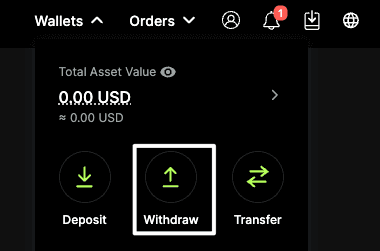
Navigate to Wallet → Withdraw
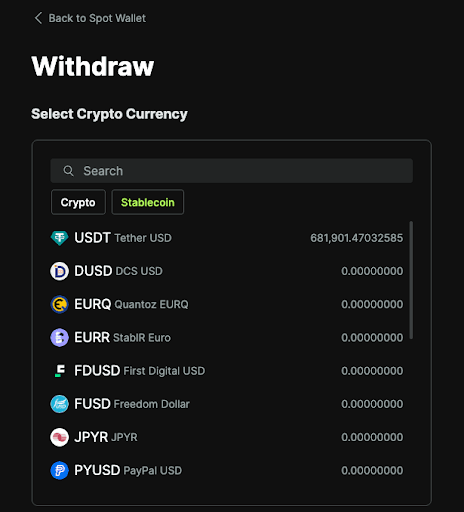
Select the cryptocurrency you wish to withdraw
Step 2: Enter Withdrawal Details
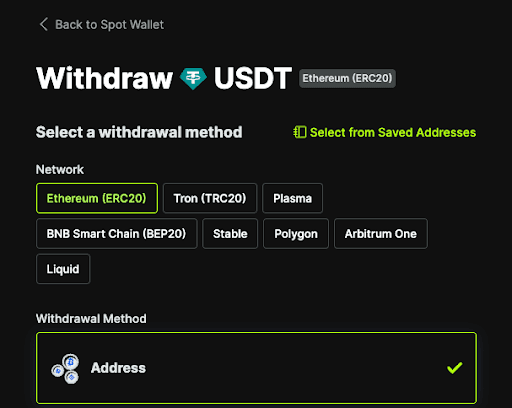
Select the correct network (e.g. ERC-20, TRC-20, BEP-20)
Enter the amount you want to withdraw and paste the recipient wallet address in the field below
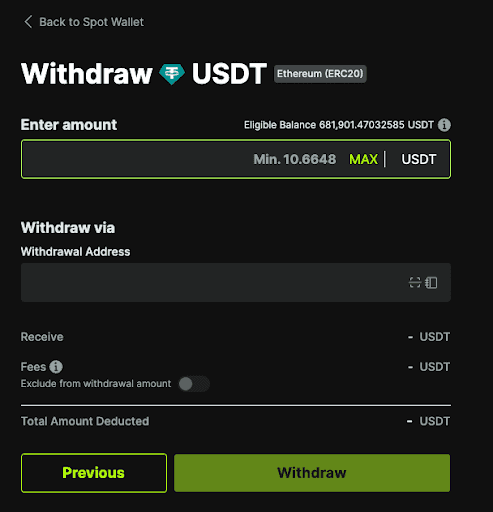
Make sure that the wallet address and network are correct. Sending funds to the wrong address or network may result in permanent loss of funds.
Step 3: Review Remaining Details and Confirm Your Transaction
Double-check all details, including:
Wallet address
Network
Amount
Click Withdraw to submit your request
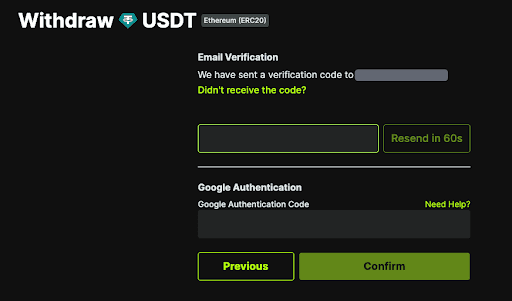
Step 4: Complete the Security Verification Process
Enter your 2FA / email verification code
Confirm the transaction by entering the codes in their respective fields
Step 5: Wait for Processing to Finish
Withdrawals are processed shortly after submission
Processing times may vary depending on the network and system checks
You can track the status of your withdrawal in your Transaction History


