How Leverage Works When Trading 1-Click Futures
Learn how leverage works on ZMO — how it multiplies your position size, why it affects your liquidation price, and which leverage level to start with based on your experience.
LL
Lulu Liu
8 min

On ZMO, leverage lets you trade with more USDT than what you actually put in.
You can control a bigger position, which means your potential gains and losses are both larger.
Here's what that means in practice.
Trade more with less money
You put in a small amount. Leverage multiplies it into a larger trading position. Every price move — up or down — is calculated against the larger number, not what you put in.
For example: 100 USDT at 20x leverage is equal to a 2,000 USDT position. The same 5% price move is now worth 10x more to you in either direction.
How it works in numbers
Using another example: 2,000 USDT at 3x leverage.
2,000 USDT You put in | × | 3x leverage | = | 6,000 USDT what you're trading with |
Your 2,000 USDT is still the most you can lose on this trade. Leverage only changes the size of the position the market is calculating against, not your deposit amount.
However, it does make it easier to win or lose money.
Here’s what we mean.
Leverage multiplies both directions equally
This is the most important thing to understand. Leverage amplifies gains and losses by the same amount.
By using 100 USDT at 20x, with a 5% price move, you can double your money, but you can also lose all of it:
No leverage (1x) | With 20x leverage | |
|---|---|---|
Setup | 100 USDT investment | 100 USDT investment |
Position | 100 USDT position size | 2,000 USDT position size |
5% move in your favour | +5 USDT profit | +100 USDT profit |
5% move against you | -5 USDT loss | -100 USDT loss (full deposit) |
Important: At 20x leverage, a 5% move against your position reaches your full deposit. The price doesn't need to move far for you to lose it all. Always check your liquidation price before confirming a trade.
Leverage and liquidation — why they're connected
Every trade has a liquidation price — the price level where ZMO automatically closes your position to prevent your loss from exceeding your deposit. The higher your leverage, the closer that price is to where you entered.
Long trade example at 3x (BTC entry at ~79,424 USDT):
Liquidation price: 53,163 USDT — roughly 33% below entry
The price has to fall 33% before the trade closes automatically
Same trade at 20x:
Liquidation price sits much closer to the entry price
A smaller move against you triggers automatic closure
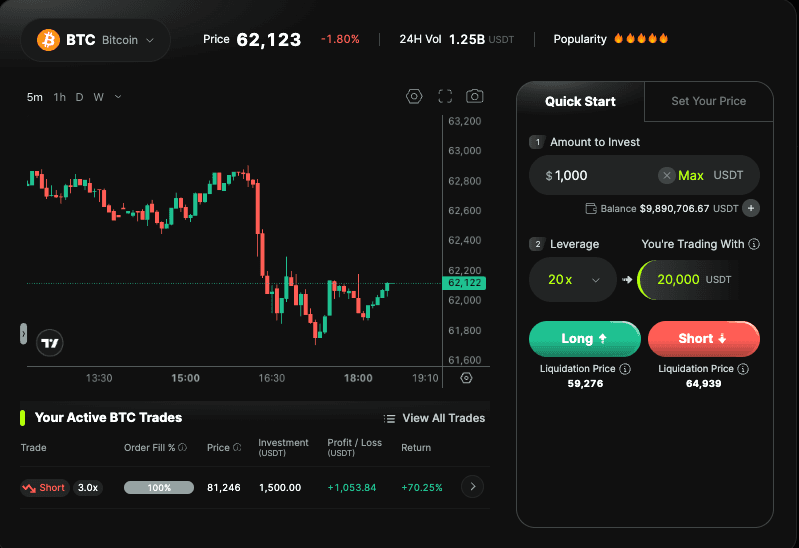
Always read the liquidation price shown below the Long and Short buttons before confirming. The closer it is to the current price, the less room the trade has to move.
Which leverage should you start with
First time trading
Start with 1x or 3x. Your liquidation price will be further from your entry price, giving the trade more room to move before it closes automatically. Once you're comfortable, you can explore higher levels.
Some experience
5x or 10x gives a meaningful position boost while keeping the liquidation price at a manageable distance. Always check where your liquidation price sits relative to the current price before confirming.
20x and above
High leverage is not for learning. A 5% move against a 20x position reaches your full deposit. Only use it when you have a clear directional view and understand exactly where your liquidation price is.
Ready to trade? Start with the demo — no real funds needed — or go straight in from $10.
Unsure of the process? Review How to Trade 1-Click Futures on ZMO to get a full breakdown of the feature.


